



One of the biggest headaches when working in JavaScript is that it has no implementation of namespaces or modules – custom functions you define may accidentally overwrite existing functions in your code or in any of the libraries that you use, making it easy to accidentally declare global variables, mess up your scope, and introduce hard-to-find bugs.
Lexical Scope
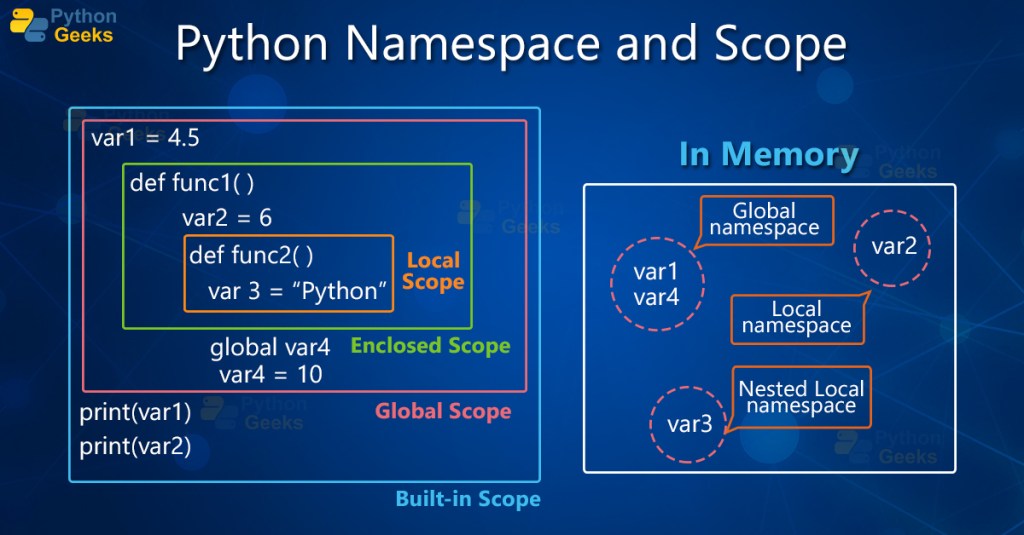
In programming, whenever you create a new function you also create a new scope, this is the context in which the program understands any named variables or functions you’re trying to invoke within other functions or globally.
When you use a variable or call a function, a program first looks to the nearest scope to match it; if the variable/function is not found, the program jumps out of whichever scope it’s in and checks the next higher level of scope and repeats this process until a match is found or returns an error if not – this “stepping-up” process is called Lexical Scope.
Managing scope is an important aspect of clean and secure programming with many languages having their own way of indicating and organizing scope. Some languages, such as Java, JavaScript, and C++ use curly braces { }, selectors e.g. ([] :: .), and access modifiers e.g. public, private, and protected, to indicate the scope of contained/selected variables and methods; other languages like Python use indentation and whitespace to indicate scope.
Lambda Functions

The power of lambda functions lie in their customizability and the ability to use them anywhere on existing code, meaning you can quickly add functionality for specific use cases without having to create and store new functions or redefine the existing code.
Some examples of lambda functions (not to be confused with AWS Lambda!) in various programming languages (note all of these simply return whatever value is passed to it):
# A lambda function in Python:
lambda x : x

-- A lambda function in Haskell:
(\x -> x)

// A lambda function in C++:
[](int x)
{
    return x;
};

// A lambda (a.k.a arrow) function in JS:
function(x){
   return x;
} // i.e. (x) => x;
One thing you may have noticed is that none of the above functions have a name, this is why lambda functions are also known as Anonymous Functions. These anonymous functions aren’t designed to be longevity, they are typically used for quick and specific operations and only exist for a short time, but they can be quite powerful in improving code efficiency and readability.
Lambda in JavaScript

Consider this problem of scope in the below JS code. We have a custom function myPrint (which could be located within the .js file we’re working on or buried in a library somewhere!) which contains a global variable we shadow in our main body:
// A Custom Function
let myPrint = function(str1,str2){
      comboString = str1 + " " + str2; // without a keyword, global var is created
      return comboString;
};

const str1 = "I want";
const str2 = "this one!";
let comboString = str1 + " " + str2;

let createdString = myPrint("But I get", "this instead!"); // uses myPrint comboString

console.log(comboString); // can you guess the result?
Our program returns the string, “But I get this instead!” as we are logging the myPrint comboString global variable instead of our intended let comboString, “I want this one!” value in the main body.
Of course in the above example we could simply add a var or let keyword before the myPrint comboString and get our intended result. But what if we didn’t have access to or didn’t know about the myPrint function?
A way we can solve this is by wrapping our code in a lambda expression and immediately calling it – in JavaScript this is known as an Immediately Invoked Function Expression (IIFE):
// A Custom Function
let myPrint = function(str1,str2){
      comboString = str1 + " " + str2;
      return comboString;
};
let createdString = myPrint("I'll now get", "the global after!");

(function(){
const str1 = "I'll get";
const str2 = "the local comboString!";
let comboString = str1 + " " + str2;
console.log(comboString);
})();

console.log(comboString);

/* output:
I'll get the local comboString!
I'll now get the global after!
*/
We can now correctly get the local comboString within our anonymous function by containing it in its own block and the global comboString back out in our main body.
We can use lambda functions to add functionality to existing data without modification:
comboString = "GLOBAL";
newComboString = (function(){
    return comboString + " - Anon says hi!";
})();

console.log(newComboString)

// output: GLOBAL - Anon says hi!
The same results using arrow notation:
comboString = "GLOBAL";
newComboString = comboString => comboString + " - Anon says hi!";

console.log(newComboString(comboString))

// output: GLOBAL - Anon says hi!
Appendix
For more resources on lambda and scope (variables) in JavaScript, W3Schools.com provides an excellent reference.
~ July 2024
 Giuseppe Gillespie Writing
Leave a comment