


Zero Trust Network Access (ZTNA) is a culmination of the principles of Zero Trust to provide secure remote access to networks, data, and devices by providing granular control to specific resources and ongoing security checks of connected devices.
By using the principles of never trust, always verify; least privilege; and assuming your network is breached, ZTNA can provide enhanced security across a network compared to traditional SSL or IPsec-based VPNs.
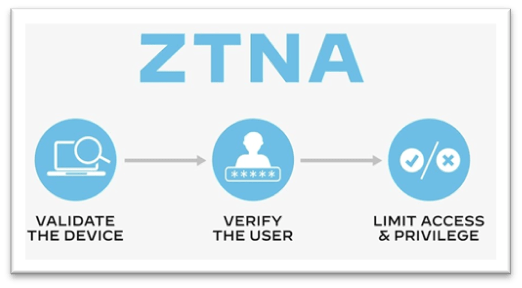
Think of ZTNA as a next-generation VPN, where in addition to providing an encrypted tunnel for communications, ZTNA also emphasizes:
- Re-identifying and security checking both device and user every time access is requested
- Strict Identity Access Management (IAM) through dynamic and granular, per-session access control based on user roles, device characteristics, and context-based cues
- Further control of access to the network and applications through a Next-Gen Firewall & ZTNA Access Proxy
- Limiting IP information to only the particular application used by the user, helping to mitigate external network mapping and reconnaissance
Let’s take a closer look at the components of ZTNA and how it is set up.
The ZTNA Workflow
A quick overview of the devices and security components involved in ZTNA:
- ZTNA Client software such as Microsoft Entra Private Access, FortiClient ZTNA Edition, or Cisco Secure Connect – This is the software that enables users to connect to the network



- A ZTNA Access Proxy, or a Policy Enforcement Point (PEP) – a devices which sits between remote users/internet and the network. Usually a Next-Generation Firewall (NGFW), such as FortiGate

- A ZTNA Policy Server, or a Policy Administrator (PA) – Stores and enforces the associated access policies related to each user role. Authentication-on-premises through a directory server (Active Directory, LDAP, etc.), or Identity-as-a-Service cloud solution


Note: ZTNA cloud solutions are also available through Identity-as-a-Service (IDaaS) products such as Okta, NordLayer, and GoodAccess.

ZTNA process

1: Device ID Validation
- When an endpoint requests access to the network, the ZTNA access proxy collects the user’s device ID
- The user sends a digital certificate (issued by the ZTNA policy server/PA) to the proxy
- User device ID and attributes, e.g. OS version, are sent to the ZTNA policy server
- The proxy applies any tags and associated rules generated by the policy server to the device – this allows for restricting access based on device attributes such as operating system or installed software

2: User Authentication
- ZTNA access proxy requests user credentials (usually through MFA)
- User provides these to the ZTNA access proxy
- ZTNA access proxy forwards user credentials to authentication server
- User ID is validated by authentication server and their roles are retrieved
- Roles are used to determine network access

3: Encrypted Session Established
- Endpoints are periodically checked for security violations
Differences Between ZTNA & VPNs
Although similar, ZTNA differs from a VPN by incorporating the principles of Zero Trust, enhancing security. Notable differences between ZTNA and VPNs include:

Authentication:
- In ZTNA authentication, both user and device are re-identified and checked every time access is requested. Connected devices also undergo continuous security checks
- In a VPN, user credentials are provided via a web browser or through a VPN client app, users are then granted access to the network with limited to no restrictions

Trust:
- In a VPN, users are trusted implicitly – once a secure session or tunnel is established, neither SSL nor IPsec (the protocols/technology behind VPNs) provide a great degree of access control over resources present in the network
- In ZTNA, however, users are trusted explicitly – even after a secure session is established, remote connections are restricted to only what resources they need to access through the PoLP
Granular Access Control:
- Leveraging the PoLP, a ZTNA client’s authorization can be fine-tuned based on role, device security posture, and context cues
- ZTNA also considers the user’s device characteristics such as operating system and installed software. With ZTNA a user may sign into the network, but if their computer didn’t meet the security requirements, say they had no local antivirus installed or they were using outdated software, they could be denied access
- While some granular access control is available through an SSL VPN, it is limited to tunnelling only to web-based applications through a web browser, which requires manual setup
- An IPsec VPN provides no access control after a secure tunnel is established
For a more in-depth look at ZTNA, check out this article from Cloudflare.
~ G.G. May 2024
 Giuseppe Gillespie Writing
Leave a comment